
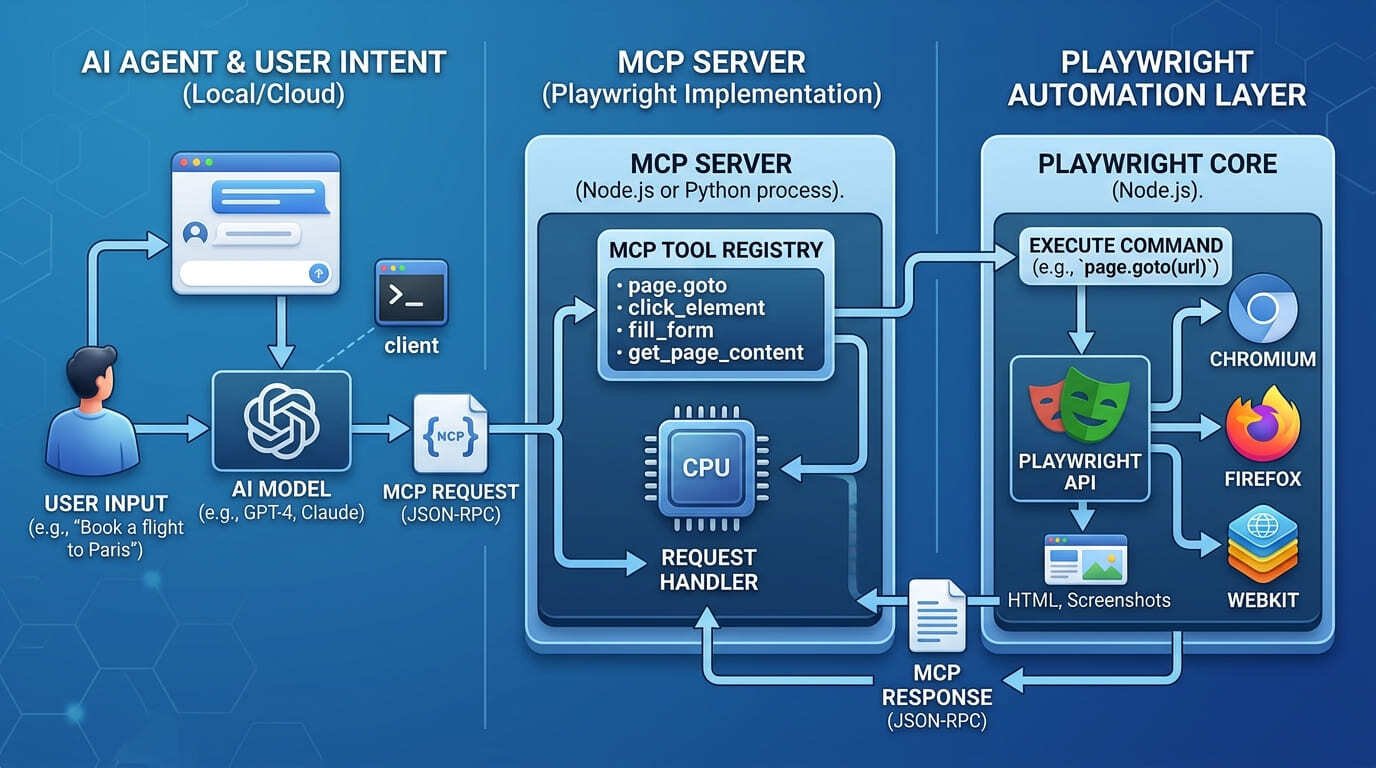
What is Playwright MCP — and why has it become the most-discussed browser automation protocol in the developer ecosystem since mid-2025? Playwright MCP is a Model Context Protocol server that connects AI agents directly to live browsers using Playwright’s battle-tested automation engine. It is the bridge that lets an AI assistant — Claude, GitHub Copilot, Cursor, or any MCP-compatible client — open a browser, navigate to a URL, click elements, fill forms, extract data, run JavaScript, and return structured results, all from a plain-English instruction with no vision model required.
The protocol was built and open-sourced by Microsoft. As of mid-2026, it has become the default browser automation standard for agentic AI workflows, pre-configured in GitHub Copilot’s Coding Agent and supported natively in VS Code, Cursor, Windsurf, Claude Desktop, Claude Code, and dozens of other MCP-compatible clients. The public MCP registry now lists more than 9,400 servers, and browser automation via Playwright is one of the most forked and starred categories in the entire ecosystem.
See our MCP Protocol vs API Gateway: Complete 2026 Guide
What Is Playwright MCP: How It Actually Works
To understand what Playwright MCP is, you need to understand the two technologies it connects. Playwright is Microsoft’s open-source browser automation library — it can drive Chromium, Firefox, and WebKit with a single API, handling modern web apps including single-page applications, dynamic content, and authenticated sessions. The Model Context Protocol is the open standard introduced by Anthropic in November 2024 that lets AI models connect to external tools in a structured, standardised way.
Playwright MCP combines them: it runs as a local MCP server process that exposes Playwright’s browser controls as callable tools. The AI agent (the MCP client) sends structured tool-call requests — navigate to this URL, click this element, fill this form field, take a screenshot, read the page content — and receives structured results back. The agent never touches the browser directly. It communicates through the MCP protocol, and the server translates those instructions into Playwright browser actions.
The Accessibility Tree Approach — No Vision Model Required
The most architecturally significant design decision in Playwright MCP is how it reads web pages. Unlike AI browser automation tools that analyse screenshots using computer vision models — which are slow, expensive, and error-prone with dynamic content — Playwright MCP reads the browser’s accessibility tree. This is the same semantic structure that screen readers use: a parsed representation of every element on the page with its role, name, state, and hierarchy.
The result is fast, deterministic, and token-efficient. The AI gets structured data it can reason about precisely, rather than pixel-level image data it has to interpret. Accessibility snapshots use significantly fewer tokens than raw HTML or screenshots — which matters because, as of 2026, latency rather than cost is the primary constraint in agentic workflows.
| // Quick setup — Claude Desktop or any MCP client { “mcpServers”: { “playwright”: { “type”: “stdio”, “command”: “npx”, “args”: [“-y”, “@playwright/mcp@latest”] } } } |
What Playwright MCP Can Do: Core Capabilities
Once configured, Playwright MCP exposes a rich set of browser capabilities as MCP tools. Microsoft’s official server ships with 25+ separate tools. The core capabilities that cover the majority of real-world agentic browser tasks are:
- Navigation — open any URL, handle redirects, wait for page load conditions
- Element interaction — click buttons, links, and interactive elements using role-based accessibility selectors
- Form automation — fill text inputs, select dropdowns, check checkboxes, submit forms
- Content extraction — read page text, extract structured data from tables and lists
- Screenshot capture — take full-page or element-scoped screenshots
- JavaScript execution — run arbitrary JS in the browser context for edge cases the accessibility tree cannot reach
- Network inspection — view all requests made since page load, monitor API calls
- Console log access — read browser console output including errors and warnings for debugging
- Session state management — save and restore cookies, localStorage, and authentication state between runs
- Code generation — output working Playwright TypeScript test code from agent interactions
The session persistence model is one of the most practically useful features for enterprise workflows. Playwright MCP stores browser profile data between sessions — cookies, authentication state, and localStorage — so an agent does not need to re-authenticate on every run. This is what separates production-grade agentic browser workflows from demo toys that break behind login walls.
Playwright MCP vs Playwright CLI: The 2026 Token Efficiency Question
In early 2026, Microsoft made a significant ecosystem decision: it released Playwright CLI as a companion tool and now recommends it over MCP specifically for coding agents. Understanding this distinction is essential for any developer choosing how to integrate Playwright into their AI workflow.
The core difference is token efficiency. A typical browser automation task consumes approximately 114,000 tokens through MCP — because MCP streams the full accessibility tree and screenshot data into the AI’s context window at every step. The same task through Playwright CLI uses approximately 27,000 tokens — a 4x reduction. CLI saves snapshots and screenshots to disk as YAML files and the agent reads only what it needs, rather than receiving a full context dump on every interaction.
| Dimension | MCP Server | Playwright CLI |
| Tokens per task | ~114,000 tokens | ~27,000 tokens (4x less) |
| Session state | Persistent (default) | File-based snapshots |
| Best for | Exploratory automation, self-healing tests, long agentic loops | Coding agents (Claude Code, Copilot) with large codebases |
| Recommended for | Exploratory, scraping, AI chat workflows | High-throughput coding agents |
The practical guidance: if you are using Playwright with a coding agent that manages large codebases — Claude Code, GitHub Copilot Workspace, Cursor — evaluate Playwright CLI. If you are building exploratory automation, self-healing test flows, or long-running agentic sessions that need persistent browser state and rich page introspection, the MCP server remains the right choice.
Playwright MCP Server Options: Which One Should You Use?
Microsoft’s official server is the correct default. But five serious alternatives have emerged since launch, each making different trade-offs on token efficiency, auth handling, and deployment model. The following comparison covers the options that matter for production enterprise deployments.
| Server | Strength | Limitation | Best For |
| microsoft/playwright-mcp | 25+ tools, best docs, GitHub Copilot pre-configured, Chromium/Firefox/WebKit | Highest token usage per task — full accessibility tree per step | Default choice for most teams. Best documentation and community |
| playwriter | Single execute tool — 80% less context per request, fastest agent responses | No guardrails — requires Playwright knowledge to use effectively | Teams hitting latency limits with Microsoft server on high-volume loops |
| mcp-chrome extension | Controls real Chrome with existing sessions. Best-in-class auth — inherits all your logged-in sessions | Lowest isolation — AI accesses full browser profile history | Behind-login automation where re-authentication is a blocker |
| Browser Use | Persistent profile reuse, high-level goals via single command, HTTP endpoint for hosted MCP clients | Separate API keys required for AI models | Long-running persistent agent sessions across multiple sites |
| fetcher-mcp | Purpose-built for web scraping, handles heavy JS frameworks that break accessibility tree | Not suitable for interactive workflows — read-only | Agentic web scraping of JS-heavy pages (React, Vue, complex SPAs) |
| In My Opinion — Waqas Raza I have been watching the Playwright MCP ecosystem develop since the Microsoft launch and here is my honest take: the token efficiency debate between MCP and CLI is real but most teams are solving the wrong problem. The teams spending weeks debating whether to use MCP or CLI are, in most cases, teams that have not yet decided what they want the agent to do. Pick a concrete use case first — end-to-end checkout testing, authenticated scraping, self-healing CI tests — and the right tool selection becomes obvious within a day. If your agents are responding too slowly, try playwriter. If your agents are breaking behind login walls, try mcp-chrome. Start with Microsoft’s server for everything else because the documentation is the best in the ecosystem and the time you save not debugging an obscure configuration issue is worth more than any token savings. |
How to Set Up Playwright MCP in Under 5 Minutes
Playwright MCP is operational in minutes on any MCP-compatible client. The following setup covers the three most common enterprise environments.
VS Code with GitHub Copilot
Open VS Code settings, navigate to MCP configuration, and add the server entry. Playwright MCP is now pre-configured for GitHub Copilot’s Coding Agent — no manual setup required in VS Code 1.97 and above. The agent can read, interact with, and screenshot web pages hosted on localhost during code generation, enabling a prompt-to-generate-to-verify-in-browser workflow.
Cursor
Go to Cursor Settings, select MCP, click Add new MCP Server, choose command type, and enter:
| npx @playwright/mcp@latest |
Claude Desktop / Claude Code
Add the server configuration to your claude_desktop_config.json (Desktop) or run the following in Claude Code’s terminal:
| claude mcp add playwright npx @playwright/mcp@latest |
Once connected, test the setup by asking your AI assistant: Navigate to https://playwright.dev and tell me what the main navigation sections are. A working Playwright MCP installation will open a browser, read the accessibility tree, and return the navigation structure in seconds.
Real-World Use Cases for Playwright MCP in 2026
AI-Driven Test Generation and Self-Healing
The TestDino and Currents.dev 2026 ecosystem reports confirm that Playwright MCP’s highest-adoption enterprise use case is AI test automation — specifically the Planner, Generator, and Healer agent architecture. The Generator agent uses MCP to interact with live pages and produce working Playwright TypeScript tests from accessibility tree data. The Healer agent monitors test failures in CI, reads the accessibility tree snapshot, identifies selector changes that caused the failure, and automatically generates corrected tests. Microsoft benchmarks report a 75% or higher success rate on selector-related failures — which are the most common source of test maintenance overhead in modern frontend codebases.
Authenticated Web Automation
For enterprise teams automating workflows behind login walls — internal tools, SaaS dashboards, authenticated APIs — Playwright MCP’s session persistence model is the architectural feature that makes production deployment viable. The browser profile stores authentication state between runs, eliminating re-authentication overhead and the rate limit and security alert problems that plague agents using stateless sessions.
Agentic Web Scraping and Research
AI agents using Playwright MCP for web research and data collection can handle the JavaScript-heavy, dynamically rendered pages that traditional scrapers fail on. The accessibility tree provides a stable, semantic view of the rendered page regardless of the underlying framework. For enterprise competitive intelligence, price monitoring, and content aggregation workflows, this is the practical choice over screenshot-based alternatives.
Conclusion: Playwright MCP Is the Browser Layer for Agentic AI in 2026
Playwright MCP answers a question that every enterprise AI team running agentic workflows eventually reaches: how does an AI agent interact with the web in a way that is fast, reliable, auditable, and does not require expensive vision models? The answer in 2026 is the accessibility tree, delivered through the MCP protocol, via Microsoft’s Playwright engine — the same automation stack that millions of developers already rely on for end-to-end testing.
Whether you are building AI-powered test automation, authenticated enterprise workflows, agentic research pipelines, or self-healing CI systems, Playwright MCP is the browser automation layer that makes those workflows practical rather than theoretical. The ecosystem — server variants, IDE integrations, companion tools — has matured rapidly and is now stable enough for production enterprise deployment with confidence.
Get started in three steps:
- Install: run npx @playwright/mcp@latest and add the server config to your MCP client.
- Test: ask your AI assistant to navigate to a URL and describe the page structure — confirm the accessibility tree is returning structured data.
- Build: identify one concrete browser automation task in your workflow — test generation, authenticated scraping, or form automation — and build a bounded pilot around it before expanding.
[Bounded Autonomy AI: Architecture for Safe Agentic Systems]
[Playwright MCP Official Docs — playwright.dev/docs/getting-started-mcp]
Frequently Asked Questions (FAQs)
Q1: What is Playwright MCP?
Playwright MCP is a Model Context Protocol server that connects AI agents to live browsers using Microsoft’s Playwright automation engine. It exposes browser controls — navigation, clicking, form filling, content extraction, screenshot capture, and JavaScript execution — as MCP tools that any MCP-compatible AI client can call. Instead of analysing screenshots, it reads the browser’s accessibility tree, returning structured semantic data about page elements without requiring vision models. It is maintained by Microsoft, pre-configured in GitHub Copilot’s Coding Agent, and works with VS Code, Cursor, Windsurf, Claude Desktop, and Claude Code.
Q2: Do I need a vision model to use Playwright MCP?
No. This is one of Playwright MCP’s primary architectural advantages. It reads the browser’s accessibility tree — the same semantic structure screen readers use — rather than analysing pixel-level screenshots. The AI receives structured data about page elements including their roles, names, states, and hierarchy, which it can reason about precisely and efficiently. This approach uses significantly fewer tokens than screenshot-based alternatives and is more reliable on dynamic, JavaScript-heavy pages where visual rendering can vary between runs.
Q3: What is the difference between Playwright MCP and Playwright CLI?
Both connect AI agents to Playwright browser automation, but they differ in token efficiency. A typical task consumes approximately 114,000 tokens through MCP and approximately 27,000 tokens through CLI — a 4x difference. MCP streams the full accessibility tree into the AI’s context window at every step; CLI saves snapshots to disk and the agent reads only what it needs. Microsoft recommends CLI for coding agents managing large codebases where context window efficiency is critical. MCP is recommended for exploratory automation, self-healing test workflows, and long-running agentic sessions where persistent browser state and rich page introspection outweigh token cost concerns.
Q4: How do I set up Playwright MCP with Claude?
For Claude Desktop, add the server to your claude_desktop_config.json file using the configuration shown in this guide. For Claude Code, run: claude mcp add playwright npx @playwright/mcp@latest in your terminal. Both methods install and configure Microsoft’s official Playwright MCP server. Once connected, you can instruct Claude to interact with web pages directly from the chat interface — navigating URLs, clicking elements, extracting data, and generating Playwright test code from real page interactions.
Q5: Can Playwright MCP handle authenticated workflows behind login walls?
Yes. Playwright MCP’s persistent session model stores browser profile data — cookies, authentication state, and localStorage — between runs by default. This means an agent authenticated to an internal tool, SaaS dashboard, or enterprise application maintains that session across multiple automation runs without re-authenticating each time. For testing behind login walls, this is the feature that makes CI-integrated agentic automation practical rather than a demo. The mcp-chrome extension server takes this further by connecting to your real Chrome browser with all existing logged-in sessions already inherited.
Q6: Is Playwright MCP suitable for production enterprise environments?
Yes, with appropriate governance controls in place. Playwright MCP runs locally by default — no browser data leaves your machine — which satisfies data residency requirements for most enterprise environments. The persistent session model requires careful credential management: agent API credentials should be scoped to minimum necessary access, agent sessions should have execution time and API call ceilings, and browser automation actions should be logged with agent identity for audit trail purposes. The self-hosted deployment model, mature Microsoft maintenance, and pre-existing Playwright community support all point to production readiness for enterprise teams.
| About the Author Waqas Raza is a Technical SEO Specialist and Digital Strategist with a focus on B2B SaaS architecture. He writes for developers, AI architects, and enterprise engineering teams building production-grade agentic AI systems. vitaloralife.com |